
Max Payne Mobile
Rockstar GamesArcade
3.14.18K Reviews
- Version
- 2.1.131
- Installs
- 500.00K
- Age Rating
- Mature 17+
Screenshots
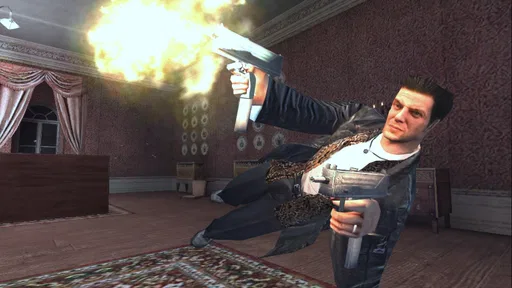
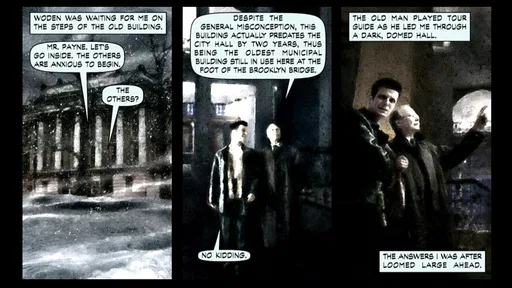
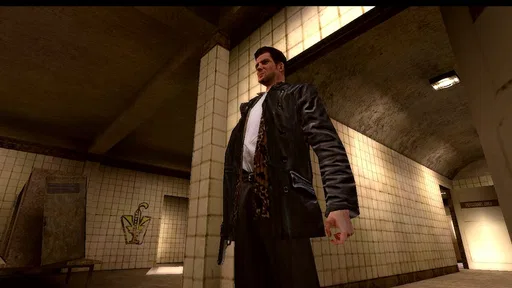
Our Review of Max Payne Mobile
 Analysis by Appyee
I approached Max Payne Mobile as a compact way to play Rockstar Games’ dark arcade shooter on a phone or tablet, rather than as a modern mobile game built around short sessions. That distinction matters immediately. The game brings a full, story-led experience to a touchscreen, but it also carries the feel of an older console and PC release. I found the atmosphere much stronger than the first few minutes of touch control suggested, and once I adjusted my hands to the interface, the familiar slow-motion gunplay became the main reason to keep playing.
It is a paid game priced at $2.99, aimed at Mature 17+ players, and it sits in a very different place from free arcade downloads filled with quick rounds and optional purchases. Rockstar Games released it on mobile in 2012, and the current version is 2.1.131. The game has passed 500 thousand installs, while its 3.1 average from around 45 thousand ratings shows a more mixed experience than the famous name alone might suggest. I think that gap is useful to understand before downloading: the underlying game is distinctive, but mobile comfort and device behavior can decide whether it feels excellent or awkward.
Getting past the first points of friction
I’d use this section to help you tell ordinary touchscreen adjustment from a problem that will keep spoiling the experience. A brief test with a comfortable grip, restrained camera movements, and a clear view of the action can reveal whether the controls suit you before you settle into a longer session. If the same input trouble persists after that, it’s sensible to reconsider the fit rather than assume more practice will fix everything.
Why the opening minutes can be misleading
The first place many players get stuck is not the story or the action; it is the physical act of playing. Max Payne Mobile asks you to look, move, aim, and react through a touchscreen, and those actions compete for space. If you normally play simple arcade games with one thumb, the opening encounters can feel unusually busy. I needed time to stop treating the screen like a set of fixed buttons and start using it as a flexible control surface.
That learning period is important because the game’s signature action depends on quick decisions. The slow-motion ability gives you a chance to turn a dangerous moment around, but it does not remove the need to position yourself and choose a target. On a phone, a slightly misplaced touch can make a clean sequence feel clumsy. I had better results when I held the device with both hands, kept my thumbs relaxed, and avoided trying to make large camera movements while also firing.
The second common obstacle is expectation. This is not a lightweight game that opens for a thirty-second distraction and immediately feels natural. It is an older, cinematic crime story adapted for mobile, so the pacing includes investigation, dialogue, movement through connected spaces, and repeated firefights. If you want a quick score chase or an endless loop, the usual arcade alternatives are a better fit. If you want a substantial single-player campaign with a recognizable voice and a bleak mood, the slower structure makes more sense.
What to check before blaming the game
Before starting, I recommend making the basic setup as calm as possible. Close other demanding apps, make sure the device has enough free storage for the installation and its working room, and update the operating system if an update is already waiting. These are ordinary checks, but they matter more for an older premium port because unexpected interruptions are harder to diagnose when the game itself is not new.
Also check that you are installing the official release from the correct store account and that the device meets the minimum operating-system requirement of version 9. That requirement is only a starting point, not a promise that every newer device will feel identical. Phones differ in screen size, aspect ratio, touch response, and background behavior. A large screen may make aiming easier, while a narrow phone can leave your hands covering more of the action.
I would begin with a short, low-pressure test rather than immediately committing to a long session. Move through the first playable area, try aiming in more than one direction, fire a few times, and see whether the controls respond consistently. This gives you a practical answer to the question that matters most: can your hands comfortably reach the controls without blocking your view?
Small control habits that make a large difference
My most useful adjustment was to make deliberate movements instead of swiping aggressively. Fast, oversized gestures are tempting during a firefight, but they can send the camera farther than intended. Shorter movements helped me keep enemies in view and made the slow-motion moments feel planned rather than desperate. I also learned to pause for half a second before entering a room, giving myself time to read the space instead of reacting after the first shot.
Touchscreen play rewards preparation more than frantic tapping. When I approached a fight with a rough idea of where I wanted to stand, I wasted fewer movements and had more attention available for aiming. That is a useful trade-off: the mobile version can feel very responsive once you work with it, but it does not hide the limitations of playing a precision shooter without physical controls.
If you use a tablet, the larger display can improve visibility, but it may also make the controls feel farther apart. On a phone, the opposite is true: everything is close, yet your fingers can cover important areas. I would not choose a device solely by screen size. The better choice is the one you can hold securely while reaching the action buttons without changing your grip every few seconds.
Recovering when a session goes wrong
When the game behaves badly, I would first separate a one-time interruption from a repeatable problem. If the app closes once, reopen it and test the same type of action. If the issue returns in the same place, note what happened: loading, changing areas, touching a control, or resuming a previous session. That simple distinction prevents random troubleshooting and helps reveal whether the problem is tied to the device, the installation, or one particular moment in play.
A safe recovery routine is straightforward. Exit the game normally, restart the device, and try again without several other apps running. If the installation appears incomplete or the game repeatedly fails to start, check the store page and the operating-system requirement before considering a reinstall. Because this is a paid title, I would avoid deleting it as a first reaction. Confirm that you can restore the purchase through the same store account, and make sure any progress you care about is handled according to the platform’s available save behavior before removing the app.
Another practical habit is to avoid testing a suspected problem while the device is already hot, nearly full, or under heavy background activity. Those conditions can make an otherwise stable game appear unreliable. Let the device return to a normal state, then repeat the test. If the same fault remains, you have stronger evidence that it is not simply a temporary performance issue.
When the app is not the real cause
Not every failed launch or stutter points to Max Payne Mobile itself. A weak or interrupted connection can affect installation, updates, or account checks even though the gameplay experience is not an online arcade service. Low free storage can also interfere with installation and temporary files. A device with aggressive battery management may suspend the game when you switch away from it, which can look like lost progress or an unexpected restart.
Screen overlays, accessibility tools, game boosters, and floating controls can interfere with touch input on some phones. I would temporarily disable anything that places buttons or panels over the game, then test again. This is especially worthwhile when taps seem to land in the wrong place rather than when the game is simply slow.
It is also worth remembering that a modern device is not automatically a perfect match. Newer hardware can be powerful, but changes in display proportions and system behavior may affect how an older mobile adaptation feels. If the game runs but the interface is uncomfortable, that is a usability problem rather than a failure of the story or shooting design. In that situation, changing your grip, orientation, or display settings may help more than repeatedly reinstalling the title.
How the full game fits into an everyday routine
I found the game easier to enjoy when I treated it as a planned session rather than a filler activity. A commute with uncertain interruptions is not ideal for a story sequence that needs attention, especially if you are likely to put the phone away quickly. At home, a quiet evening or a tablet session gives the atmosphere more room to work. The grim narration, dramatic pacing, and bursts of action benefit from concentration in a way that a disposable arcade game does not require.
There is still room for shorter play. A player can complete a limited section, stop at a sensible point, and return later, but I would not buy it expecting every session to feel complete in a few minutes. The best everyday use case is someone who wants a portable version of a traditional action campaign and is willing to learn the controls gradually. The worst use case is someone who wants instant, low-commitment entertainment with no setup or adaptation.
The paid model also changes how I judge it. The initial price is modest, but the listing includes in-app purchases of $2.99 per item, so I would review the purchase screen carefully and avoid assuming that every possible transaction is part of the base experience. For a buyer comparing it with free arcade games, the advantage is a more focused purchase decision; the disadvantage is that the mobile version still asks you to accept older design and touch-control compromises rather than delivering a completely modernized experience.
What experienced players should know about the workflow
The strongest way to play is to combine movement, positioning, and the slow-motion mechanic instead of using the special action as an emergency button every time a fight becomes difficult. I had more success when I entered open spaces with an exit in mind and used the cinematic ability to create a controlled advantage. That approach reduces frantic screen tapping and makes the game’s action feel closer to its intended rhythm.
Another non-obvious trade-off is that the mobile format makes visual awareness more valuable than raw speed. On a large display, it is easier to read the room before committing. On a smaller one, I benefited from slowing down between encounters and checking corners rather than rushing because the next target might be partly hidden by my own fingers. The game rewards patience even though its action looks explosive.
I also recommend judging progress by how confidently you handle the controls, not only by how far you have advanced. Early frustration can disappear after a few sessions, but only if you change your method. If you keep fighting the interface with the same grip and the same hurried swipes, the game may never feel comfortable. That is a genuine limitation of the port for players who prefer physical buttons, not a problem that every software update can solve.
Who should choose it, and who should skip it
I would recommend this game to players who enjoy mature crime stories, deliberate third-person action, and the particular satisfaction of turning a losing firefight into a stylish escape. It is also a sensible choice for someone who wants a paid, self-contained-feeling mobile game from Rockstar Games rather than another free arcade download built around constant prompts. The established audience is large enough to show continued interest, but the average rating suggests that the name alone should not decide your purchase.
I would hesitate to recommend it to anyone who dislikes touch controls in shooters, wants a game designed specifically around current phones, or needs reliable entertainment in tiny interruptions. Players who prefer competitive online play, endless score chasing, or very simple controls will probably be happier with another arcade option. This game’s strengths are its mood, campaign structure, and recognizable action style; those strengths do not automatically overcome discomfort with mobile aiming.
The age rating of Mature 17+ is another practical filter, not a minor label to ignore. The tone is dark and the subject matter is aimed at adults, so it is not an appropriate general-audience recommendation. Parents choosing games for younger players should look elsewhere, even if the price and mobile format seem convenient.
My practical verdict after working through the friction
Max Payne Mobile remains an interesting purchase because it offers something more specific than a generic arcade game: a portable, story-driven shooter with a strong identity and a distinctive slow-motion rhythm. I enjoyed it most after treating the touchscreen as a skill to learn rather than expecting console controls to transfer perfectly on the first try. The game feels purposeful when I have time to settle into its pace, and its darker presentation gives it more personality than many quick mobile alternatives.
My reservation is equally clear. The mobile experience depends heavily on your device, your grip, and your tolerance for an older adaptation. A smooth installation does not guarantee comfortable aiming, and a powerful phone does not remove the need to adjust your playing habits. If you are buying it for a friend, I would describe it honestly as a classic action campaign that may require a little patience on touch controls, not as an effortless pick-up-and-play arcade title.
At $2.99, I see it as worth considering for the right player, especially someone who values atmosphere and single-player progression over novelty. I would perform the basic operating-system, storage, account, and control checks before settling in, then give the game a few sessions rather than judging it from the first awkward firefight. My recommendation is conditional but positive: choose it for the campaign and mood, skip it if touch-based shooting is already a deal-breaker.
Verdict
Strengths of Max Payne Mobile
- Faithful recreation of the classic PC and console shooter
- Excellent bullet-time mechanic makes firefights feel cinematic
- Strong noir atmosphere with memorable comic-book storytelling
- Precise touch controls with customizable button placement
- Works offline, making it suitable for gaming without mobile data
Limitations of Max Payne Mobile
- Aging visuals and animations may feel rough on modern devices
- Touch aiming can be difficult during fast, crowded encounters
- The campaign is relatively short compared with newer action games
- Some scenes and dialogue reflect dated design and presentation choices
- Compatibility and performance may vary across newer Android devices
Other Releases by Rockstar Games
View All
GTA: Liberty City Stories
Adventure4.0

Grand Theft Auto: San Andreas
Action4.5

GTA: Vice City - Definitive
Action3.8

Bully: Anniversary Edition
Action4.0
Similar Picks in This Category
View All
Subway Surfers
SYBO Games4.6

Stickman Party 234 MiniGames
PlayMax Game Studio4.6

Subway Princess Runner
Ivy4.4

Temple Run
Imangi Studios4.2

Zombie Tsunami
Mobigame SAS4.6

Stack Ball - Crash Platforms
CASUAL AZUR GAMES4.5
Frequently Asked Questions
What is Max Payne Mobile about?
Max Payne Mobile is a third-person action shooter that follows Max Payne, a police officer investigating a conspiracy after the murder of his family. The mobile version preserves the original game’s dark film-noir atmosphere, cinematic storytelling, and comic-book-style cutscenes. Its main attraction is the signature Bullet Time mechanic, which lets Max slow down combat and react to enemies more effectively.
Does Max Payne Mobile work on modern Android and iOS devices?
Compatibility can vary depending on your device, operating system version, and whether the game is still officially supported in your region. Before downloading, check the current Google Play Store or App Store listing for supported devices and requirements. Older phones may experience installation, graphics, or performance issues, while newer devices generally offer smoother gameplay when the title is compatible.
Does Max Payne Mobile require an internet connection?
Max Payne Mobile is primarily a single-player experience and does not require a constant internet connection once it has been properly installed. An internet connection may still be needed to download the game, verify the purchase, or restore access through your app-store account. After installation, you can usually play the campaign offline, making it suitable for travel or areas with limited connectivity.
Are there in-app purchases, advertisements, or multiplayer modes?
Max Payne Mobile is designed as a premium single-player game rather than a free-to-play title. Depending on the store version and region, it is generally purchased upfront and does not focus on advertisements, energy systems, or recurring in-game purchases. It also does not provide a conventional online multiplayer mode, so the experience centers on completing Max’s story campaign alone.
Is Max Payne Mobile suitable for children?
Max Payne Mobile is intended for mature players because it contains frequent gun violence, blood, strong themes, crime-related situations, and a bleak narrative involving murder, addiction, and revenge. The controls and action are accessible, but the subject matter is not child-friendly. Parents should review the age rating shown in their local app store before allowing younger users to download or play it.
Play our best games!


